Pinterest is not usually a social media platform businesses tend to associate advertising with. It is the forgotten child of platforms stereotyped with guilty pleasures and women looking for their dream living room.
Marketing strategies tend to focus on the big names like Facebook, Instagram, Tik Tok, Snapchat…but in reality, they are missing out on an opportunity by overlooking the web’s biggest virtual pin board.
At the end of 2020, Pinterest had 459 million users. With only 100 million in 2015, it is one of the fastest-growing social media platforms in the world. Not only are we going to tell you how to get started with Pinterest advertising, but also why it should be of interest for you to use Pinterest in your marketing strategy!
Where to start with Pinterest ads
Before reading on, note that Pinterest Ads is not yet available in all countries. Check this list to see if it is available in yours.
Pinterest Ads’ platform is very similar to Google Ads, so if you have any experience with the latter, you will be pinning in no time. If on top of that you have a personal Pinterest account, this process will be a breeze.
1. Create a Pinterest Business account
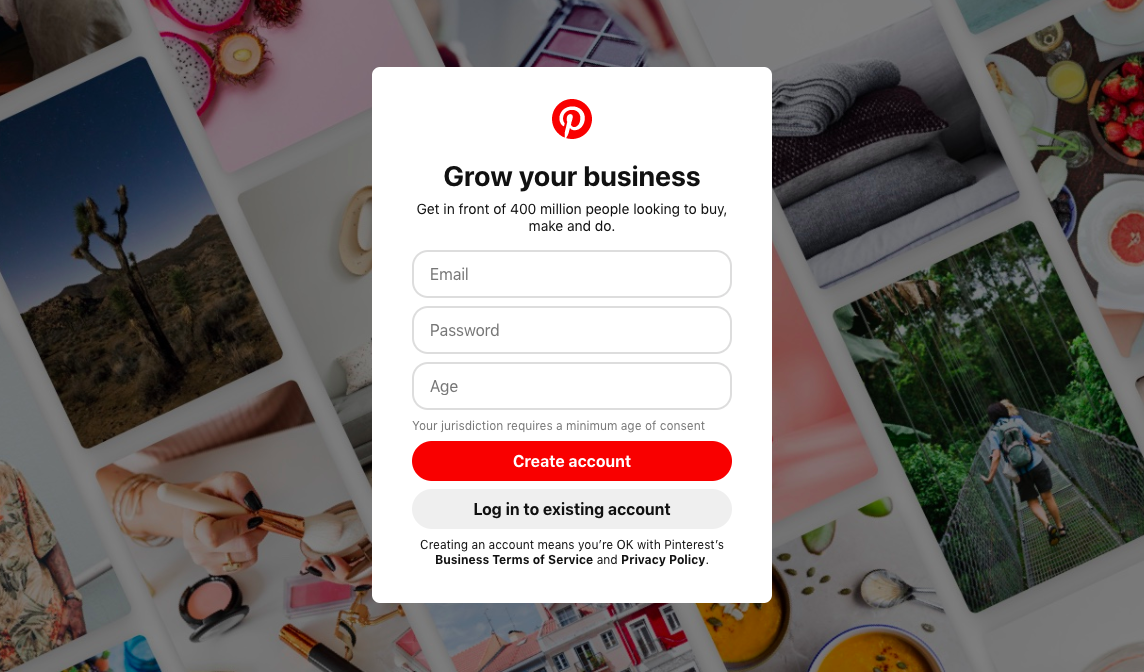
Pinterest has two types of accounts available to the public: personal or business. In order to advertise, you will need to create a business account. If you have a personal account and wish to convert it into your principal business account, you can! Simply use your personal or business email address to get it all started.
2. Campaigns and Objectives
Start by creating one campaign. On the homepage of your Pinterest Business account, click on ads – create ad. This will bring you to choose your campaign objective.
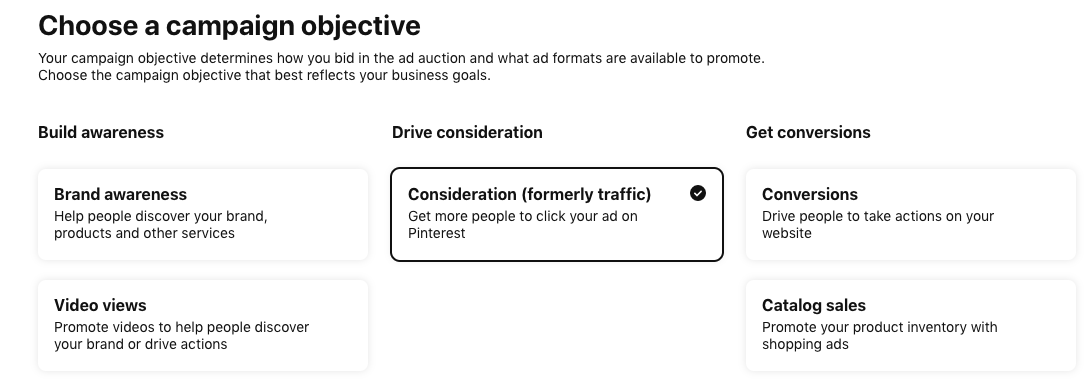
Objectives will determine how you bid in ad auctions and the types of ad formats best suited to your objectives. Before you select your business objectives, make sure you have a business plan where you have laid out your marketing goals and what you expect from your advertisements. Pinterest’s five campaign objective are:
- Brand awareness – best for businesses who want to increase their visibility of products and services, and awareness to potential new clients. Bidding = manual maximum CPM (cost per thousand clicks)
- Video view – ideal for businesses who prefer video montages. Pinterest offers quality targeting to find those best suited to watch your videos. Bidding = manual maximum CPV (cost per view) for 2 seconds or more of video played
- Consideration – Drive clicks on your ads. Bidding = Automated or manual CPC (cost per click) Note: This is the only campaign objective that allows for a campaign-level budget, the rest require budgets at the ad group level (read on).
- Conversions – For businesses who already have enough visibility and who want their viewers to start taking action (subscribing, purchasing, signing up…). Bidding = Automated or manual CPA (cost per acquisition)
- Shopping catalogues – Gain visibility when Pinterest users are looking for similar ideas. Bidding = Manual CPC or oCPM (optimised cost per thousand) where you also set target CPA.
Now that you have created your campaign(s) and decided on your objective, you can start building your ad groups.
3. Ad groups
If you are unfamiliar with the difference between a campaign and an ad group, imagine that a campaign is like the winter collection of a clothing brand and the ad groups are the various items of clothing e.g. shirts, trousers, shoes, etc. who will each represent their own ad group.

Each ad group will need its own targeting strategy, audience list, keywords and interests, demographics, ad placement, and budget (unless the campaign is running under a Consideration objective). It may seem like an overwhelming amount of information, but Pinterest makes it very simple to follow. This is also what will help your ads be at the right place at the right time in front of the right user.

For keywords and interests, Pinterest has a minimum of 1 and a maximum of 200,000 keywords. The broader the keyword, the more competition your ads will face e.g. “trousers”. However, more precise keywords will appear to users actively researching your kinds of products e.g. “blue winter trousers”. Pinterest keywords work like Google Ads keywords with broad, phrase, exact, and negative matches.
4. Ads
If a campaign is the winter collection of a clothing brand, and the ad groups are the types of clothing (coats), the ads are individual items of clothing e.g. black, knee length coat, white polyester coat etc. On Pinterest, an ad = a Pin. Here are the eight Pins available for advertising:
1. Static Pins and ads – one singular image with a small caption to

2. Standard width video Pins and ads – videos with the same dimensions as regular Pins

3. Max. width video ads – video pin that stretches across the entire user’s feed on mobile.
4. App install ads – one singular image with the possibility to download an app without leaving the Pinterest main page
5. Carousel Pins and ads – multiple images available with swipe through

6. Shopping ads – one image or video with the possibility of purchase. These are also called buyable pins.

7. Collections Pins and ads – one main image with three smaller images underneath on mobile view
8. Story pins – one singular pin with a mix of images, videos, lists, and text
Each Pin has their own specification requirements that you can find here.
A few of these ad types come as paid formats (Max. width video ads and App install ads) but luckily, the others do not.
Once your ads are ready and you are happy with the campaign(s) you can launch it all!
Promoted pins
Once your pins are launched, and you are using a pay-per-click on your selected pins, keep in mind that they will appear somewhere on the top of Pinterest search results pages with the small tag ‘promoted pin’. This is to make the scroller aware that you have paid for your content to appear amongst the first. But don’t worry, this won’t stop people from clicking on your items. 1 in 2 people has bought an item after having seen promoted pins.
Rich Pins
It’s a hassle to have to update your pins or create new pins every time you change or release a new product on your website. This is why Pinterest has created rich pins where pins are automatically updated or even created based on your website content.
Not only will the content be directly taken from your website, but it will also be shown to the correct target audience.
Rich pins are one of Pinterest ads’ top best practices and need to know advertising strategies because there will never be a promotion, new product, or announcement that won’t be released.
Tips for your ads
Pinterest Pins are not the usual kind of advertisements that companies are used to. Just like with any platform, knowing your audience and the behaviours associated with the platform are key. Before embarking on the design of your Pins, take note of these tips:
Vertical Vertical Vertical
The general trend of Pins is vertical and Pins with a ratio of 2:3 to 4:5 are 60% more likely to be repined than others.
No faces
It may seem like an odd tip, but avoid putting faces in Pinterest ads. Faceless pins have a 23% better chance of getting repined than those with a smiling model.
Text overlay
Although Pinterest is mostly about imagery, overlay some text over the visuals. It can be as simple as a short slogan or your brand name but text can go a long way.
Topic of the day
There is an algorithm that suggests that different categories have different levels of popularity on different days of the week. Sunday is for Food & Craft, Monday is Fitness, Tuesday is Technology, Wednesday is Quotes, Thursday is Fashion, Friday in Humour, and Saturday is Travel. Launch your pins on the day of the week that suits it best.
Timing
Every social media platform has its ‘peak hours’; the hours when there is the most traffic. To give your Pin the best chance at visibility, post between 2PM and 4PM or 8PM and 1AM. The best day of the week is Saturday. You can schedule your pins to launch via your account.
Research the trends
The best performing Pins are the ones that keep up with the current trends. Your trendy Pin has a 94% chance of increase in CTR (click-through-rate) if it is related to trending topics. An easy way to look for trending topics is on your Pinterest’s analytics. For businesses looking to leverage these trends effectively, collaborating with social media marketing companies UK can provide valuable insights and strategies.
Pinterest worthy words
Check out this list of Pinterest’s most repined words. Don’t use these words as keywords (as they may not be relevant to your product), but incorporate them in your overlay or description text to attract users. In addition, try to keep descriptions between 150 and 350 words.

Why advertise on Pinterest?
You may have already decided that you want to advertise on Pinterest, but here are some additional insights into why you have made the right choice.
As mentioned above, there are almost half a billion users on Pinterest. Although it is a large market, there are currently only 1.5 million brands advertising on its site, which means roughly one brand for every 330,000 users. If a company targets the right audience, it has the potential of having its very own 330,000 user audience free of competition. The perfect scenario: large market, low competition.
Additionally, Pinterest users have ideal purchasing habits:
- 98% of users have tried new things after having used the site
- 50% made a purchase off of one of the brands they saw advertised
- 93% plan their purchases based on items they saw on Pinterest
When a user likes a Pin, they pin it on their own board. Once the Pin is on their board, they will see it over and over again. The users convert themselves into a business’ very own remarketing strategy without having to do anything. Furthermore, the repined Pin is then viewed by all the followers of that user, extending the ad’s reach.
Conclusion
You are now ready to start advertising on Pinterest. For too long, this social media platform has been overlooked by businesses as a marketing tool. Use this guide and tips to create your marketing plan or ask for some social media advice from our experts.